Obtaining Write Access to the National Metadata Directory
While the majority of metadata records should be automatically harvested to the National Metadata Directory (NMD), it may be necessary to create a metadata record for datasets from a repository that is not (yet) harvested by the NMD automatically. In order to do so, you need a user account.
Note that getting a user account is not needed just to browse and/or search records.
Getting User Account in the NMD
Anybody can get a user account in the NMD. If you are affiliated with an academic institution in the Czech Republic (e.g. a university student or employee, AS ČR employee, …), an automatic registration is all you need. Otherwise, your application will be decided upon manually.
Browse to https://nma.eosc.cz. Select Sign in.
You will be presented with a list of institutions. If you are affiliated
with an academic institution in the Czech Republic, you should find it in
the list, such as in this example:
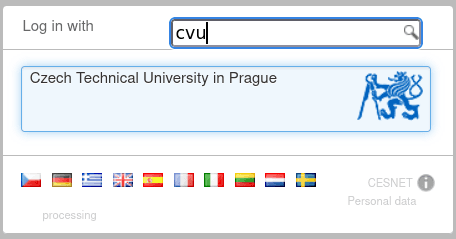 Using your institutional login is highly recommended.
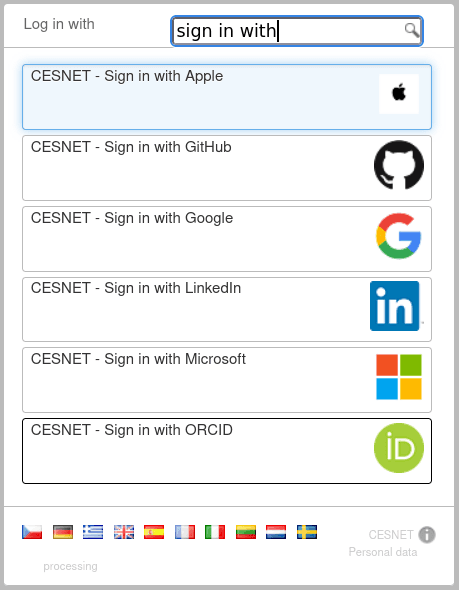
If it is not the case, you may use your identity from one of the following companies (“identity providers”): Apple, GitHub, Google, LinkedIn, Microsoft, and/or ORCID. Just search for the company name in the institution selection box:
After selecting your institution (or other identity provider), log into your institution’s system. You may be presented with a list of attributes about your person that are requested by the NMD. Please note that at least your name, e-mail address, and infrastructure identifiers are necessary to get access to the NMD. Should this be your first encounter with the national e-infrastructure, you may also be shown formal documents such as personal information processing statements, asked to verify your email etc. Just follow the procedure.
When using your institutional login, provided you are an employee or a student of an academic institution, your access will be automatically approved. Otherwise your application will be checked manually and you will be notified via email. Kindly allow up to two business days for manual approval.
Logging into the NMD
After obtaining the user account, you can log into the NMD, using the Log in button. Similar to the registration process, select your institution from the list (or the social network identity used previously). Your browser will likely remember the previously selected organisation.
When logged in, you find your username in the upper right corner, you can also modify your preferences there.
Common Issues
If you cannot log in and the page states “Internal Server Error”, it is most likely due to some cookie mismatch in the browser. Try deleting cookies for the https://nma.eosc.cz site and log in again. Alternatively (in a hurry), you can also try an anonymous browser window or another browser.
How to proceed
Now you probably want to verify a dataset for RIV.
In case of any issues, kindly contact support.